


Top 5 Best Free Programs To Speed Up Your PC
Best SoftwareSoftware ReviewsSystem Tuning March 30, 2017 Andrew Baxter
Tune up your Windows PC with these five great system optimization programs.
You buy your new PC and the love affair begins… It’s so fast! With so much memory! This relationship will never go bad! But alas, over time, the shine wears off and your amazing new super-computer starts to slow down. It gets laggy and more crash-prone and your eye starts to wonder… But wait! Help is at hand! You don’t have to cheat on your faithful machine, or trade it in for a younger model. No my friend, what you need is a PC optimization utility to help tune your computer back to its former glory. Well, luckily we’ve compiled a list of our 5 best free programs to speed up your PC and help bring the love back. What’s more, they can all be downloaded now, here on FileHippo.
CCleaner
We’re not the only ones that love CCleaner – it’s probably the most popular freeware cleaner globally with over two billion downloads since its launch in 2003! Piriform’s CCleaner is a quick and easy to use program which makes your computer faster, more secure and more reliable. It removes cookies, temporary files and various other unused data that clogs up your operating system. This frees up valuable hard disk space allowing your system to run faster. Removing this data also protects your anonymity meaning you can browse online more securely. Another cool feature is the built-in Registry Cleaner, which fixes errors and broken settings to make your computer more stable. Plus, in addition to these great features, the simple, intuitive UI and rapid but powerful cleaning make CCleaner a favourite among novices and techies alike.
System Mechanic
System Mechanic from iolo technologies is an all-in-one solution for optimizing your system, that’s more suited to an experienced user, rather than a novice. Packed with features, it has more than 50 automatic tools to clean up your hard drive, repair your registry, defragment your hard drive and optimize memory, system and internet settings. One of our favourites is CRUDD (Commonly Redundant or Unnecessary Decelerators and Destabilizers) removal, which strips away any unwanted bundled software or empty files, Stability Guard, LiveBoost, and more. One of the top features for Windows 10 users is its Privacy Shield function. With the click of a mouse you can undo many of the privacy invasions and tracking tools that are pre-installed in the operating system, rather than having to hunt through your directory and turn off each feature one-by-one.
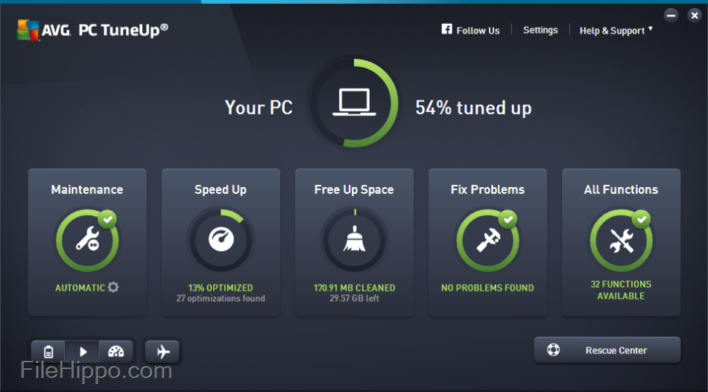
AVG PC TuneUp
AVG PC TuneUp scores big from the word go, as a single subscription is will cover every device you have; whether that’s a Windows PC, a Mac, or an Android tablet. AVG PC TuneUp lets you gain more speed with less crashing, a longer battery life and more disk space, whether you choose automatic maintenance or want to take a more hands on approach. It keeps your computer at peak performance with its patented flagship feature Sleep Mode, which stops all resource-draining programs from slowing down your PC. Other neat features include Live Optimization, which works silently in the background, constantly prioritizing all the applications that are running to increase responsiveness of your work and games; plus Economy Mode and Flight Mode – which combine to provide significantly prolong battery life – and so are invaluable when you’re on the go.
Advanced SystemCare
We’re big fans of Advanced SystemCare’s one-click approach. This makes it easier for users to clean up junk files, leftovers, and registry entries, and optimize start-up items, system resources, and internet connections, all of which helps to speed up computer boot time, responding and browsing. Its Performance Monitor gives accurate real-time data of CPU, GPU and mainboard temperature and intuitive usage report of disks, RAM and CPU to keep you updated on your PC’s status, while offering quick access to manage the system resources and easily troubleshoot performance issues. We also love FaceID, which automatically catches intruders who are secretly accessing your PC and prying into your privacy! All this plus it’s easy on system resources, with a download of just under 46mb.
Glary Utilities
Glary Utilities is a free system cleaner and performance booster for your Windows PC. The easy-to-use and intuitive interface features one-click functionality and easy, automated options that give you the choice of either one-click maintenance or a customisable selection. Download Glary Utilities and you get more than 20 system utilities that allow you to customise your scan and features options, including: Registry Cleaner; Spyware Remover; Start-up Manager and Shortcuts Fixer; all of which will improve your computer’s performance. We really like its Windows Boot Time monitor, which sits in the middle of the main interface window, and tells you how long Windows is currently taking to boot on your PC and compares that with other Windows users. Clever! From here you can also access and manage the list of the programs that load on Windows start-up and delay any that take your fancy.