



Google Chrome may be using 20GB of extra storage on your computer for its AI
In May 2026, we reported that Google Chrome could be using about 4GB of storage space for downloading an AI model automatically. This was done to allow AI tasks to run locally including writing tasks, summarizing web pages, organizing tabs and warning the user about scams.

Fast-forward to the present, and it turns out this AI model has now grown to a whopping 20GB in size. According to a report by Chipp.in, Chrome will only download the AI model on devices with supported hardware capabilities. But, Google has not mentioned what these tech specs are. So, users will need to check their device manually. This can be done by opening a new tab and loading chrome://settings/system. If the “On-device AI” setting on this page is enabled, there is a chance that Chrome has likely downloaded an AI model on to your computer.
But it’s not always there, you may have to look into your system folders to check whether Chrome has created the “OptGuideOnDeviceModel” directory to store the AI model in.
Firefox 154.0 introduces Smart Window, better translations and more
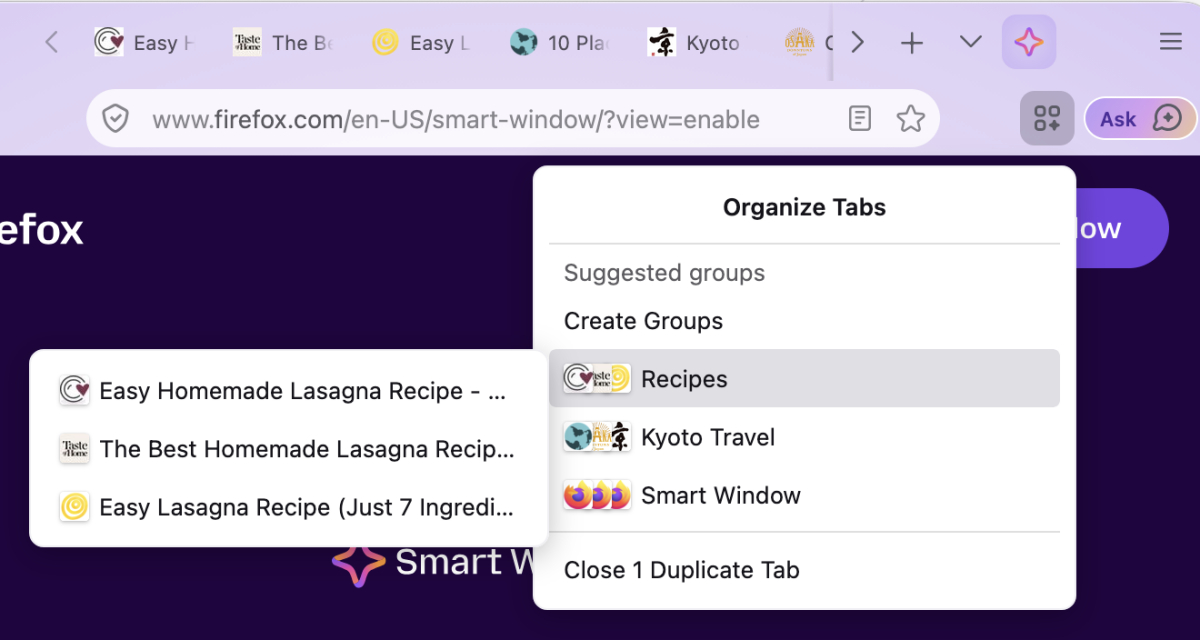
Mozilla has released Firefox 154, and it comes with a Smart Window. This AI-powered feature can suggest groups of related tabs and also suggest a name for each group.
Firefox has added support for NVIDIA GeForce NOW, to allow users to stream PC games. Firefox profile backups are now available locally for macOS, backups can be restored on Windows, macOS or Linux. Windows users can now choose a different icon for Firefox. Mozilla says that this option is coming to macOS and Linux soon.
Shift + clicking on refresh now does a hard reload that clears and updates cached favicons of web pages. Firefox View is hidden by default for new users/profiles, and for profiles where it has not been used recently. Users can add it back from the Customize toolbar menu,
Local translations have been improved, Firefox can now translate content in iframes. The browser runs language identification on all page loads for full-page translations.
Firefox for iOS now has an ad blocker
A few weeks ago, we reported that Mozilla was testing a built-in ad blocker in Firefox for iOS. The feature is now rolling out to the stable channel of the mobile browser.
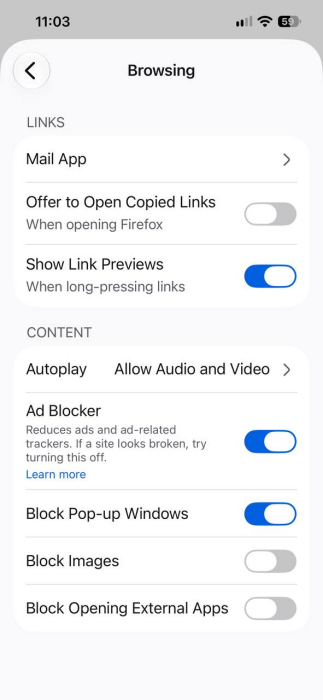
It is not enabled by default. Users will need to tap on the three-dot menu > Settings > Browsing > Content, and toggle the Ad Blocker. According to a support page on Mozilla’s website, the ad blocker uses a filter list based on EasyList to block ads before they load. The feature is considered experimental, and does not block all ads. Users will encounter ads on search engine result pages, and sponsored content on Firefox Home or New Tab. However, Firefox’s ad blocker will block third-party ad networks, ad-related trackers, third-party ads on many websites, pop-ups and overlays.
In addition to the ad blocker, Firefox for iOS has new icons. There is a new gesture to open the Tab tray, and one to delete tabs. US English users can now use voice to ask queries and get an answer from the new tab.
Peacock subscription prices increased
Peacock has announced that has increased the prices of its streaming plans. This happens to be the 4th price hike in four years, and comes just about a year after the previous price adjustment, which happened in July 2025. According to the streaming service, the price change was done in order to provide the best experience for viewers, remain competitive in the market, and deliver unique content across genres.

The ad-supported plan, Select, now costs $8.99 per month, after a $1 hike from $7.99. Peacock’s Premium plan, which shows ads, has jumped from $10.99 to $12.99. The only ad-free tier, Premium Plus, has gone from $16.99/month to $19.99 a month. The new prices came into effect on August 18th for new and existing subscribers.
It’s worth noting that Peacock will be included in the YouTube Premium subscription starting in 2027, and it maybe a cheaper option for those who are interested in both services.
Waterfox 6.7 Supernova update brings rounded design, tree tabs, improved ad blocker
Waterfox has been updated to version 6.7, and this Supernova update is massive. It brings a variety of improvements across the board, starting with a new design called Nova. The style closely resembles Firefox’s project Nova, with rounded tabs, address bar, menus and more. The browser also has 12 new accent colors to choose from, in Light and Dark modes.

Waterfox 6.7 comes with a new vertical tabs style called tree tabs. It also supports tab groups, and the sidebar can be customized. The Settings panel of the browser has been redesigned as well, neatly divided into sections for tweaking various options.
Waterfox’s built-in ad blocker has been improved, and now has its own section under the settings, where users can manage filter lists, exceptions, and choose to allow ads from Waterfox’s search partners. The ad blocker’s pop-up menu has been redesigned and now displays the number of ads and trackers blocked on a web page, a toggle to disable ad blocking on the current website. It’s quite and managed to block ads on YouTube too.
Waterfox 6.7 has moved from Gecko Extended Support Release 140 to ESR 153. The release includes official packages for Linux distros, and ARM65 builds for Windows and Linux.
OpenAI announces ChatGPT for teens
OpenAI has introduced a ChatGPT mode for teens. The new mode has parental controls that allow parents to set restrictions for their kids on how they access the chat bot. It has time management options for quiet hours and study hours.

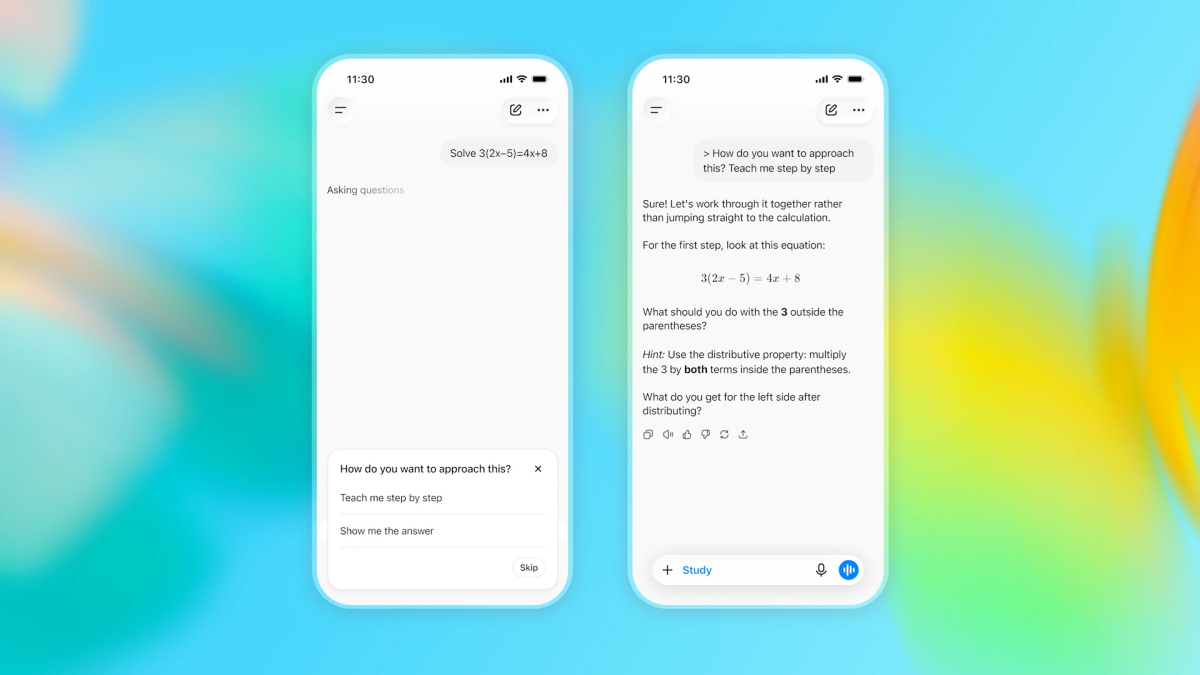
The Study Mode will use guiding questions with step-by-step support to educate teens, while new responsible homework reminders will be displayed if a teen tries to shortcut an assignment. It also features quizzes and learning visualizations to help teens practice and test their knowledge.
Teen mode will automatically be activated for users who have identified themselves as being 13 to 17. OpenAI’s system will also estimate the age of the user and automatically apply the rules for the account. OpenAI says that the options will protect teens from sensitive content like graphic violence, adult content, and also display warnings and safety information about certain topics. Parents will receive a notification if the system flags something as harmful content.